Never be surprised by an expired secret or certificate again.
Credential Watch tracks every client secret and certificate in your Microsoft Entra ID and Azure Key Vault, and alerts the people who own them before anything expires.
30-day free trial. Read-only access. You never share a secret.

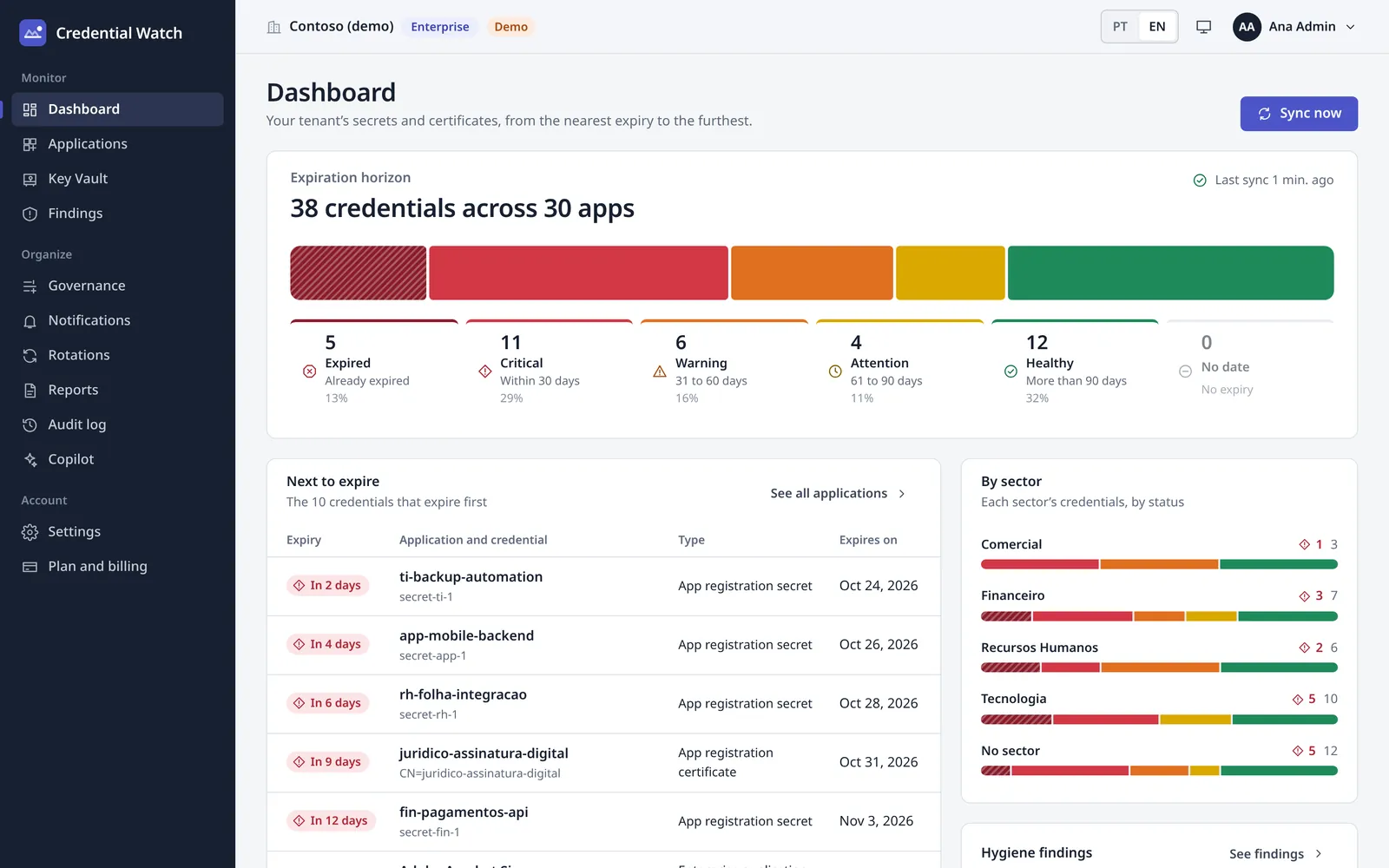
38 credentials across 30 apps
A demo tenant, as the dashboard shows it.
- 5ExpiredAlready expired · 13%
- 11CriticalWithin 30 days · 29%
- 6Warning31 to 60 days · 16%
- 4Attention61 to 90 days · 11%
- 12HealthyMore than 90 days · 32%
Your whole tenant on one screen.
What you see minutes after the consent. Screens from a demo tenant.
Every secret and certificate by days to expiry, the next ones to expire and each sector's status.
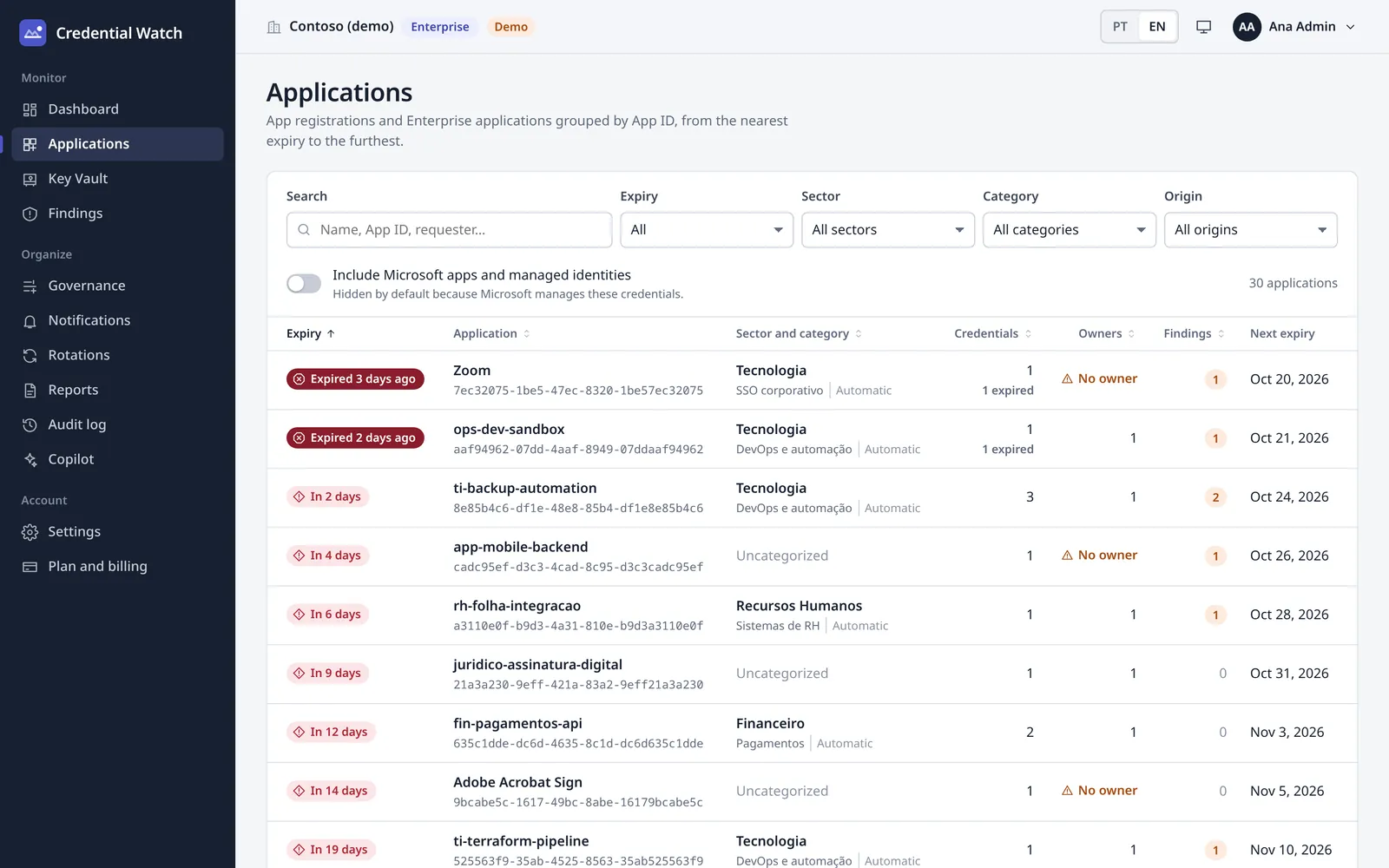
App registrations and enterprise applications in one list, filtered by expiry, sector, category or origin.
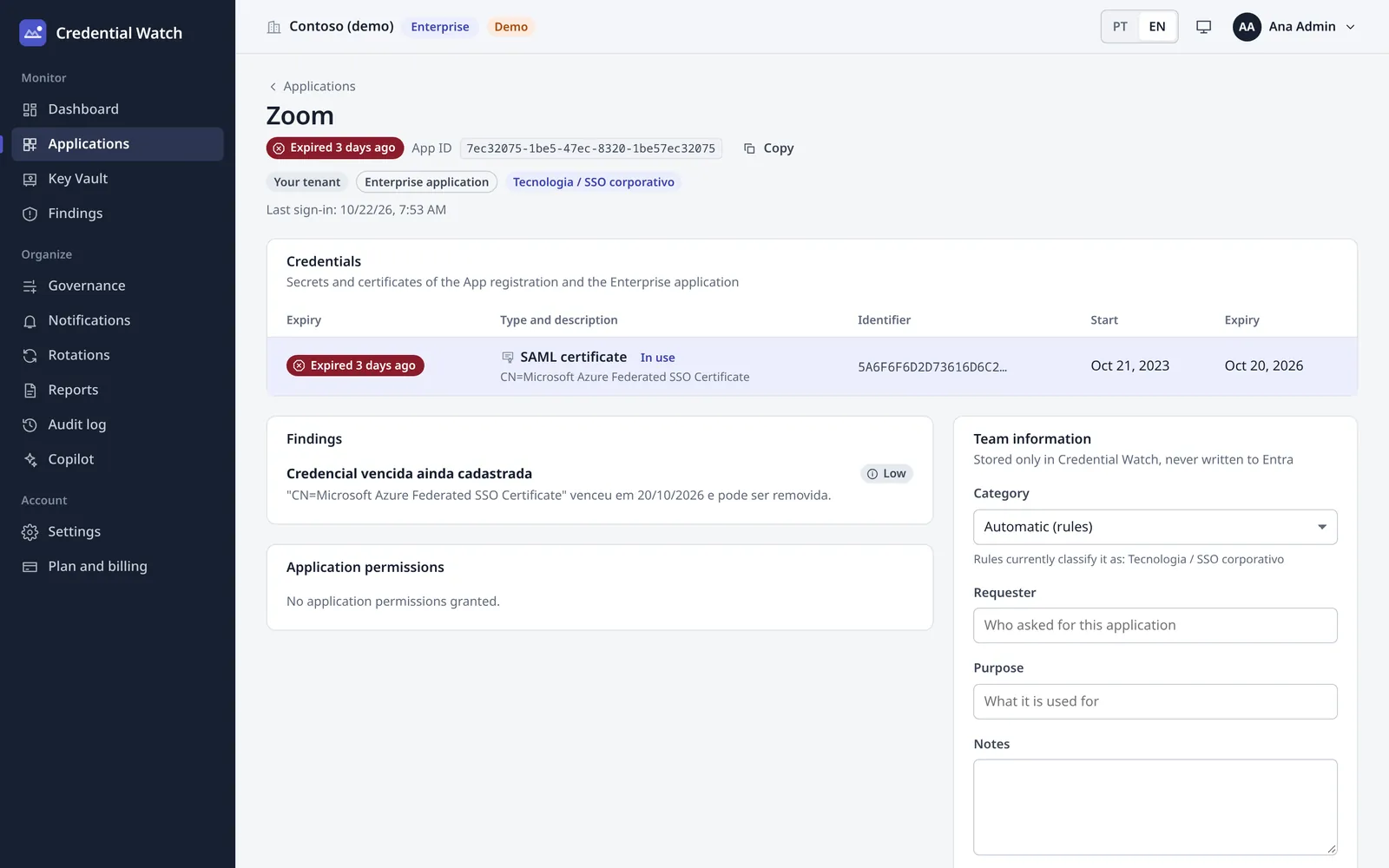
Credentials, findings, permissions and who owns the app, with its sector and category.
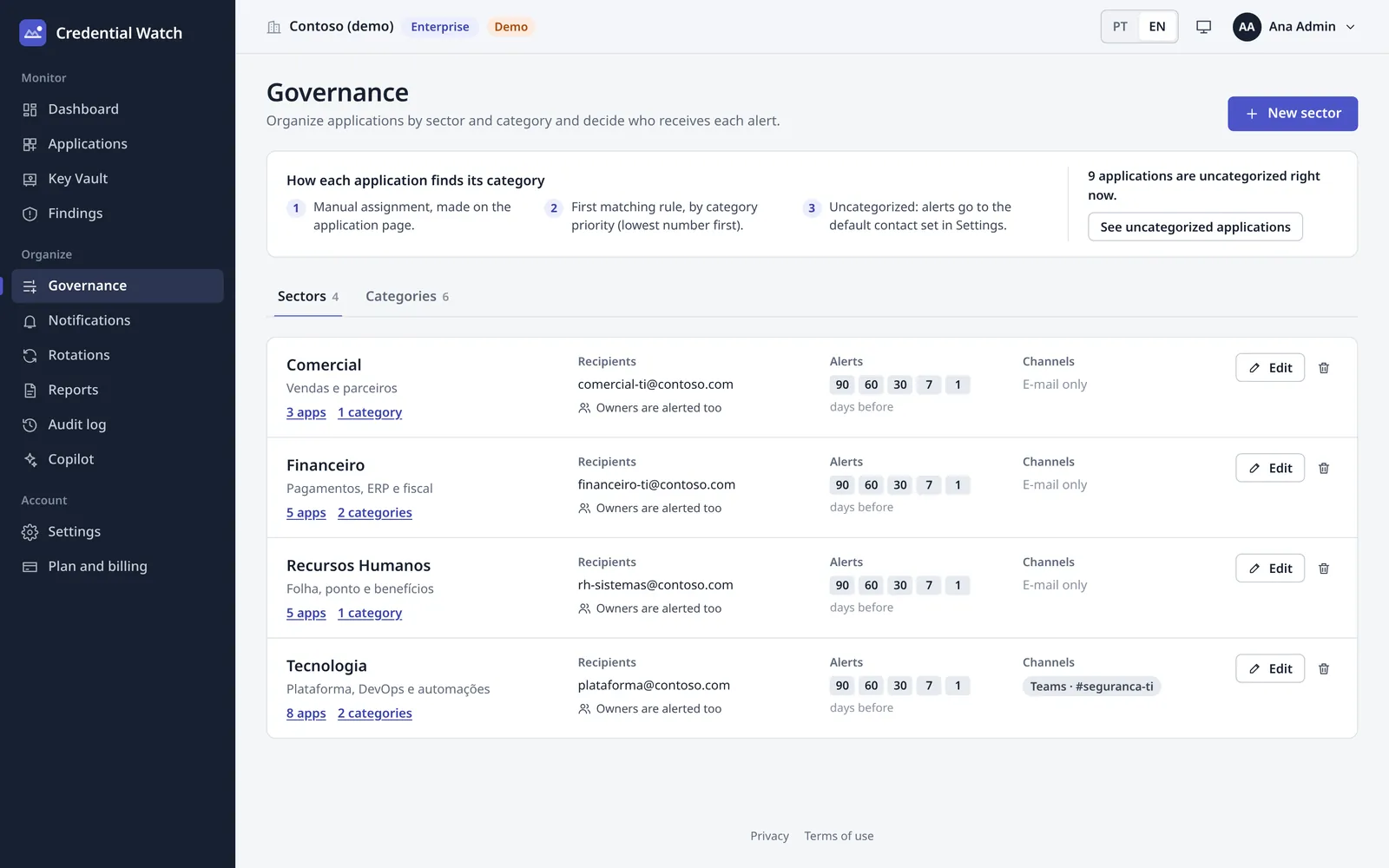
Who gets each alert: emails, milestones in days and channels per sector, plus the rules that sort apps into categories.
An expired secret doesn't warn you. It just breaks.
Client secrets and SAML certificates expire on a date someone picked a year or two ago. When the day comes, integrations stop and people can't sign in, usually in production.
Integrations fail silently
An expired client secret stops an API, a sync or a payment job, and the error shows up far from the cause.
Single sign-on goes down
When an enterprise app's SAML signing certificate expires, nobody can sign in to that app.
Spreadsheets don't keep up
Reminders go stale the day someone changes teams, and nobody knows who owns each app.
Running in three steps.
Subscribe on Microsoft Marketplace
Pick a plan or start the free trial. Billing goes through your Microsoft account.
Sign in and approve read-only access
Sign in with Microsoft. An Entra ID admin grants read-only consent on one screen.
Your dashboard is ready
Minutes later every app, secret and certificate is listed, nearest expiry first.
Everything that expires, and who to tell.
- Full inventory
- App registrations and enterprise applications in one list, with client secrets, certificates, SAML signing certificates, owners and permissions.
- Azure Key Vault
- Secrets, keys and certificates with an expiry date, across your vaults. Values are never read.
- Sectors and categories
- Group apps by the team responsible, with automatic rules by name, tag, owner or vault and a live preview of what each rule catches.
- Alerts that reach people
- At the milestones you choose (90, 60, 30, 7 days). One email per person per run, and app owners are included automatically.
- Hygiene findings
- Apps without an owner, long-lived secrets, high-privilege permissions, unused credentials and expired ones still registered.
- Reports and audit trail
- CSV exports that open cleanly in Excel, and a log of every change for your audits.
Alerts go to
- Microsoft Teams
- Slack
- Webhook (HMAC)
- Jira
- ServiceNow
Assisted rotation
Enterprise planCreate a new secret and write it straight into your own Key Vault, then remove the old one when you're ready.
Zero secrets. Not even ours.
A tool that watches your credentials shouldn't become one more credential to worry about.
- You never hand over a secretNo client secret, no connection string. An admin approves read-only access and that's it.
- The service holds no secretsIt signs in with a managed identity and federated credentials, so there's no password of ours to leak.
- Metadata onlyNames, dates and owners. Secret values and private keys are never read.
- Your tenant, isolatedEach row in the database belongs to one tenant, enforced by row-level security.
- Revoke any timeRemove the app in Microsoft Entra ID and access ends on the spot.
What it reads
- App and credential names
- Start and expiry dates
- Owners' names and emails
- Permissions granted
What it never reads
- Client secret values
- Private keys
- Certificate private keys
- Key Vault secret values
Ask Microsoft 365 Copilot.
The Credential Watch agent answers in Copilot what's about to expire and which apps have findings, and moves an app to another category once you confirm.
Included in the Professional and Enterprise plans.
What expires in the next 30 days?
4 credentials expire in the next 30 days:
- fin-payments-apiClient secretin 2 days
- hr-payroll-syncClient secretin 6 days
- Contoso SSOSAML certificatein 12 days
- kv-prod / api-keyKey Vault secretin 27 days
Should I email the owners?
Plans for every tenant size.
Subscribe and pay through Microsoft Marketplace, where the prices are.
Free trial
30 days, free
Up to 100 apps
- Everything in Professional
Essential
Price on Marketplace
Up to 300 apps
- Inventory, sectors and categories
- Email, owners, Teams, Slack and webhooks
- Hygiene findings, reports and audit trail
Professional
Price on Marketplace
Up to 1,500 apps
- Everything in Essential
- Azure Key Vault
- Jira and ServiceNow
- Microsoft 365 Copilot agent
Enterprise
Price on Marketplace
Unlimited apps
- Everything in Professional
- Assisted secret rotation
Questions before you subscribe.
Which permissions does Credential Watch ask for?
Read-only Microsoft Graph application permissions, approved once by an Entra ID admin:
Application.Read.AllReads app registrations, enterprise applications and their credentials (never the values).User.ReadBasic.AllReads the owners' basic profile: name and email, to send alerts.AuditLog.Read.AllReads sign-in activity to flag unused credentials. Optional, needs Entra ID P1 or P2.
Does it read my secret values?
No. It reads metadata only: names, dates, owners and permissions. The one exception is assisted rotation on the Enterprise plan, where the new secret goes straight into your Key Vault and is never stored on our side.
How does Key Vault monitoring work?
Give Credential Watch the Key Vault Reader role on the subscriptions you want watched; the dashboard gives you the command, ready to run. It lists secrets, keys and certificates with their dates, never their values.
Where is my data stored?
Credential Watch runs on Microsoft Azure and stores only metadata, isolated per tenant. If your company needs a specific region, talk to us before you subscribe.
What about LGPD and GDPR?
The only personal data is the name and email of app owners and of the people who sign in, used to send alerts. Every change is in the audit trail, and you can ask us to export or delete your tenant's data.
How do I cancel?
Cancel the subscription in Microsoft Marketplace (Azure portal, SaaS). To remove access as well, delete Credential Watch from Enterprise applications in Microsoft Entra ID.
Find out before it breaks.
Start the free trial on Microsoft Marketplace, or tell us about your tenant and we'll get back to you within 24 hours.
Prefer to write directly? [email protected]